


Earlier Versions
| Name | Size | Uploaded | Game Version | Downloads | |
| 0.6 (license update) release | 779.85 KB | Oct 10, 2014 | 0.25 | 730 |  Download Download |
| DevHelper0.6.zip release | 779.74 KB | Jul 28, 2014 | 0.24.2 | 227 | Download |
| DevHelper0.5.zip release | 57.29 KB | Jul 18, 2014 | 0.24 | 148 | Download |
| DevHelper0.4.zip release | 6.13 KB | Jun 11, 2014 | 0.23.5 | 199 | Download |
Description
Kragrathea's PlanetFactory plugin is a pretty cool little plugin but what really stood out for me was the auto saved game loading mechanism. Upon seeing that I just realized how much time I have spent doing the following:
- Wait for game to load
- Click "Start Game"
- Click "Resume Saved"
- Selected a saved game from the list and clicking "Continue"
So with his permission I have stripped out all the planet generating code and added a new useful feature for developers and modelers. The ability to not just load a saved game but also go straight to either the VAB or SPH!
How to use it. Install it as usual in the GameData directory. Run KSP and you will have some options. While KSP is loading all the parts/plugins, pick what you want to happen then let the plugin do the heavy lifting when KSP is done loading.
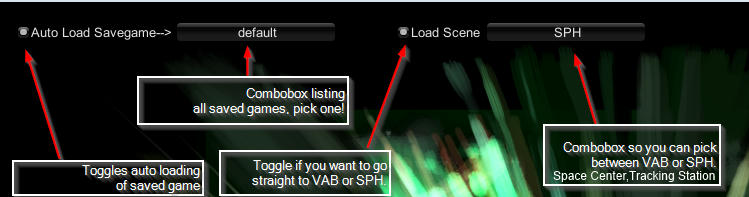
If you have both toggles off, you will be prompted with which saved game you wish to load.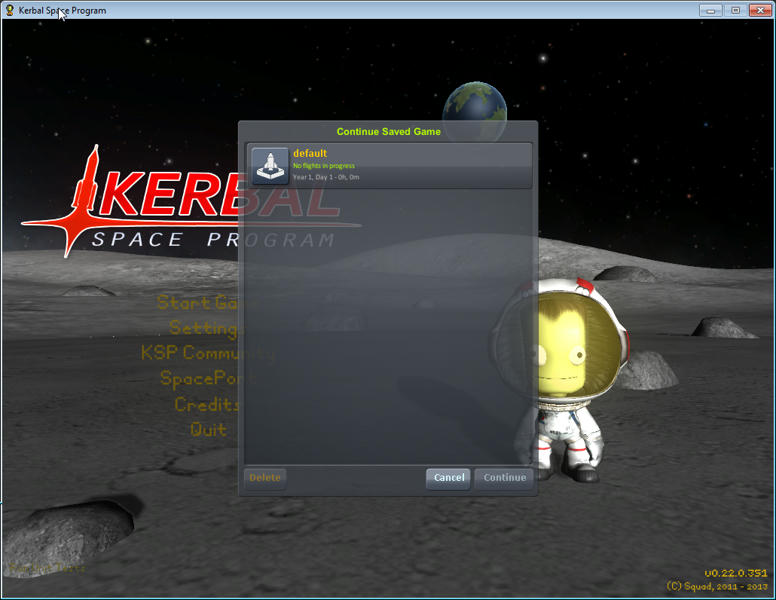
I suggest running this with at least 1 saved game started otherwise it will not work correctly. If auto load savedgame is not enabled the resume game menu will show up with nothing present. If auto load savedgame is enabled it will take you to the start menu.
v0.5
Toolbar support added. Why? Now there is a GameDatabase reload button. Perfect for those who modify values within a config file and instead of having to go to the space center, press Alt+F12, Game Database and clicking the Reload button. You can do this while in the VAB/SPH! After clicking it you will need to click list to refresh the parts.

Source: https://github.com/sirkut/DevHelper
Add a comment